Blizzard Quote [source]
Get ready to snack on one of Sanctuary's most sneaky beasties!
That's right, nephalem. We recently tasked with you with creating a Diablo-inspired dish in our Reaper of Recipes challenge, and now a winner has been chosen. Gaming gastronome @kierpanda from Eat Game Live has cooked up her favorite submission, and the results are diabolically delicious. We think even Tyrael's fickle stomach would be pleased!
Behold, the Sand Shark Caldeum Style (a.k.a. Baked Hake with Quinoa):

To learn more about this challenge, the winning recipe, and heaps of other scrumptious, game-themed treats, head on over to Eat Game Live. Thanks to everyone who submitted recipes, and congratulations to Louis Sarlin for this tasty creation!
Have your own Sanctuary-themed recipes? Then be sure to share them in our Community Creations forum!
Blizzard Quote [source]
Some of you may or may not know about an elusive NPC in the world of Sanctuary by the name of Dane Bright. This young man is a self-made merchant who, from time to time, enjoys selling a Legendary or Set crafting plan or two. If you're looking to gear up your lower level characters with some crafted items (or simply interested in collecting as many Blacksmithing plans as possible) then these featured guides just might be the thing for you.
About the Guides:
In this particular Goatman's Guide of the Week, we're featuring not one, but TWO player-created guides.
The first guide, created by Arkaidyn, features a quick video walkthrough of "How to Find Dane Bright." In the guide, Arkaidyn covers a variety of information he's collected based on his own experiences farming for Dane, as well as on the experiences of other Diablo III players. Check out the video below, or head over to Arkaidyn's YouTube page.
The second guide takes the form of a Diablo Wiki page created by Bluedragon (and curated by Elly from Diablo IncGamers). This guide includes all of the basic information you might expect about Dane Bright, including possible spawn locations, what plans Dane can sell, the gold cost for each, and his reset timer. It's been formatted simply, but neatly and features a nice, easy-to-read table.
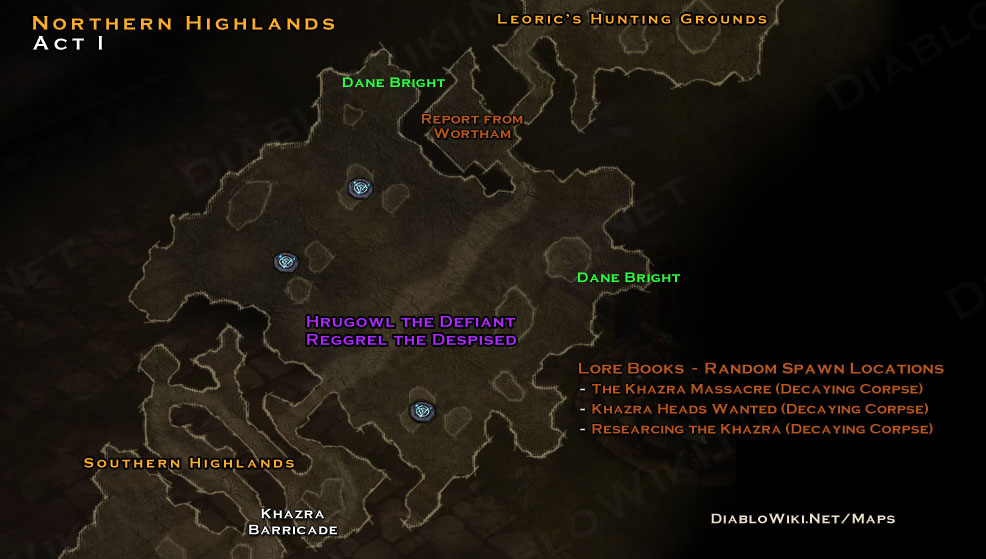
You can share your own experiences with and knowledge about Dane Bright with the Diablo IncGamers community here and here. Happy hunting!
Why These Guides Are Awesome:
- They can empower players to complete (or least further flesh out) their crafting plan collections.
- They're driven by player experience, which means your contributions can help.
- It also means these guides are on-going project, some we think is pretty cool.
- They've helped spawn some interesting in-game communities!
Additional Information:
Communities, you say?
That's right! There are several in-game communities both in the Americas and Europe gameplay regions dedicated to tracking down Dane Bright himself. If you're interested in locating and joining these communities, just follow these quick steps:
- While logged into Diablo III, open on the Communities window (SHIFT + O by default).
- Click on the "Find button" located at the bottom of the window.
- Select the Search field and enter "Dane Bright" to bring up related communities.
Is searching for an elusive NPC interesting to you? Did this guide help answer any of your questions about Dane Bright? Leave us your thoughts in the comment section below, or head over to this thread on the diablo.incgamers forums to share your story while searching for Dane Bright.
Found any helpful guides lately or created your own? Then be sure to send them over to grimiku@blizzard.com!
The double drop rate for Legendary items from the Anniversary Buff is being made a permanent change starting tomorrow.
Blizzard Quote [source]
Hello folks, I come bearing exciting news. Due to the overwhelming popularity of our Anniversary buff we have decided to keep the increased Legendary drop rate once the Anniversary celebration ends. Once the buff is disabled tomorrow morning, you will find that the new base line drop rates for Legendary items will be the same as those you have all enjoyed for the last week.
Happy hunting and link the loot!
Blizzard Quote [source]
The Crusader's background and history certainly played a role in the development of her abilities. For example, as members of a divine martial order, Crusaders are never truly alone and can trust their companions to have their backs in battle. This idea manifests in skills like Phalanx, Bombardment, Akarat's Champion, and Steed Charge.
Today, Leviathan#1356 shares a build that focuses on those stalwart associates, with a tendency for big bursts and rapid resource regeneration.
About the Build:
It's been said that sometimes the best defense is a good offense, and Leviathan's "Zoosader" build epitomizes this anecdote. Phalanx takes the forefront in this set of skills, and additional pet summons from complimentary items such as Haunt of Vaxo and the Asheara's Vestments allows the Crusader to summon a contingent of troops to stand by her side in battle.
In addition to allies, this build capitalizes on quick and effective burst damage. "The goal is to have access to area-of-effect (AOE) skills at all times to clear trash mobs quickly and then to utilize sustained burst to take down Elite packs before they ever have a chance to overwhelm us," Leviathan writes in. "Many people believe that the key to Hardcore is a strong defense, but I'd maintain that having just as strong an offense is essential, too."
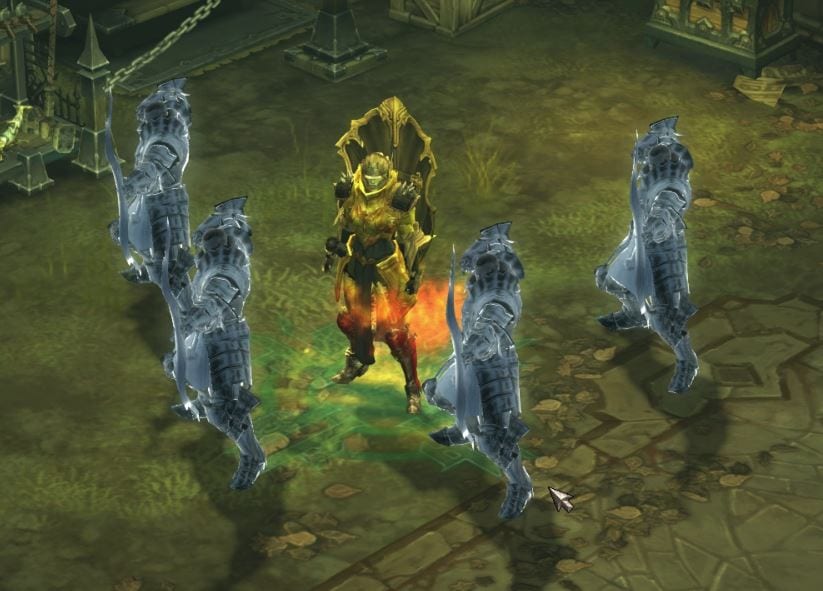
My own Crusader has also been experimenting as a Zoosader this week!
To support this burst-oriented play, Leviathan focuses on high resource regeneration by utilizing one-handed weapons and selecting skills with short cooldowns, ensuring that these big push moments come in regular strides. After all, the less your enemies have the option to target you, the less damage there is to mitigate.
The Skills:
Before we get too far into the details, it should be noted this build was submitted before Patch 2.0.5 went live earlier this week. As a result, while I've preserved the original build below, I've also added comments regarding recent changes that reflect how this week's patch affects its concept and execution.
Active Skills:
- Justice (Burst)
- Primary Wrath generator
- Reliably procs thematic items, such as Haunt of Vaxo and the 4 Set bonus from Asheara’s Vestments
- Provides additional crowd control with a minor stun
- Fist of the Heavens (Retribution)
- Primary AoE damage dealer
- Primary (and only) Wrath spender
- Allows the Crusader to maintain range from his enemies while dealing substantial damage
- Has a little more control over AoE damage direction than other offerings
- Steed Charge (Ramming Speed)
- Can serve as a great fight initiator
- Primarily serves as a method of re-positioning out of hairy situations
- Phalanx (Bowmen)
- Short cooldowns are preferable and play well with Akarat’s Champion available
- Note: This skill functions differently as of patch 2.0.5
- Rather than Akarat's Champion regularly resetting the cooldown on Phalanx (Bowmen) over time, it now allows rapid use of the skill back to back
- This results in a much larger singular burst of wave clearing power, leaving less to chance than its previous iteration
- Note: This skill functions differently as of patch 2.0.5
- Compliments a ranged play style
- Serves as one of the many companions integral to the build's theme
- Short cooldowns are preferable and play well with Akarat’s Champion available
- Laws of Valor (Critical)
- High attack speed supports rapid resource regeneration
- Critical Hit Damage builds on bursty aspects and compliments Phalanx damage
- Additional attacks increase the likelihood of regular affix procs
- Akarat's Champion (Rally)
- A great damage and resource generator for big burst moments
- Offers extreme cooldown reduction to encourage regular use of short cooldown skills
- Note: This skill functions differently as of patch 2.0.5
- Rather than Akarat’s Champion regularly resetting cooldowns regularly, it now allows rapid use of these skills back to back
- This results in a much larger singular burst of wave clearing power, leaving less to chance than its previous iteration
- Note: This skill functions differently as of patch 2.0.5
- Offers excellent utility by breaking crowd control effects; extremely valuable in Hardcore as a result
Passive Skills:
Passives in this build offer much more in terms of customization. As a result the skills listed below are suggestions and not mandatory in order for the build to be successful.
- Righteousness
- Additional resource regeneration ensures Fist of the Heavens can always be at use between cooldowns
- Lord Commander
- Vastly increases the damage output of Phalanx
- Helps ensure Steed Charge is regularly available for tough combats
- Finery
- A well-rounded supplement to damage
- Blunt
- Synergizes with the main resource generator to provide just a bit more damage
- Fervor
- Patch 2.0.5 brought a major revision to this passive, and this works well with the intent of favoring one-handed weapons in Leviathan's build.
- Additional attack speed and cooldown reduction compliment many other skills.
- Recommended to swap out with either Blunt or Righteousness.
The Items:
The Zoosader is a social creature, and needs all the friends she can get to fight alongside her! The recommended items below offer her a veritable menagerie of assistance and help her survive the toughest of rumbles, while burst play is supported through additional resource regeneration options.
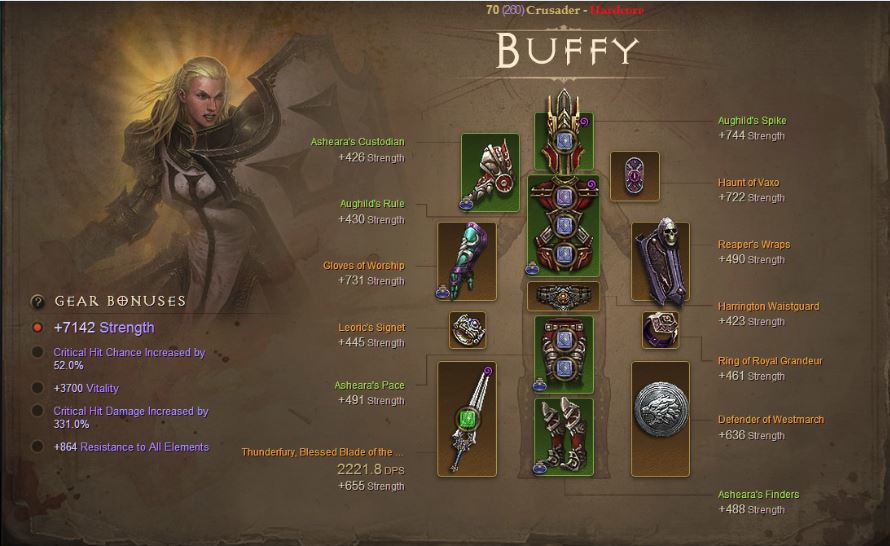
Sadly, Leviathan’s original Zoosader has been laid to rest, but here’s a glance at this fallen hero's equipment!
Core Items:
While not mandatory to function, the additional survivability offered by these items as well as their minion-focused affixes help for the foundation for this build.
- Asheara's Vestments
- Four piece bonus brings your followers into the fray, who can tank some of those nasty hits for you
- As a crafted set, a bit easier to gear towards and acquire, and a great place to start
- Haunt of Vaxo
- Shadow clones provided by this item offer wonderful stun utility
Complementary Items:
These items compliment the core items, and mostly focus on increasing efficiency.
- Reaper's Wraps
- As a crafted item, a bit easier to gear toward and a good place to start
- Offers excellent resource regeneration for any class
- Ring of Royal Grandeur
- While a highly coveted item in general, this build can make use of a lot of set items, making this bauble that much more valuable
- Aughild's Authority
- Three Piece bonus offers strong survivability in Nephalem Rifts
- A sure go-to for any Hardcore character
Recommended Stats:
Specific items are less of a concern with this build, and can be filled in for by focusing on the following stats:
- As a pet build, Critical Hit Damage scales wonderfully and drastically improves the performance of Phalanx (Bowmen)
- Attack speed provides not only much-desired DPS, but indirect Resource Regeneration
- +Physical or +Lightning damage both prove beneficial, but are less required due to the used skills being split between elemental types
- +Damage bonus to specific skills, such as Phalanx, Fist of the Heavens, and Justice, should also be sought
Recommended Difficulty and Game Mode:
When this build was submitted, Leviathan was regularly using it in Hardcore and farming Torment III on his own. Certainly, with the appropriate levels of Damage and Toughness, Zoosader can stand on its own in any difficulty (and any game mode), and flourishes when tackling challenges from Bounties or Nephalem Rifts.

Brave Zoosader Buffy tackled a variety of challenges before falling in combat.
Of course, we always recommend taking careful steps, especially in Hardcore, when trying something new. Be sure to feel out where your gear level is before diving headfirst into any build!
Why We Like This Build:
Pet-based builds can be really appealing for a number of reasons. Not only is it cool to have a cadre of companions following along, but the Crusader makes for a thematically strong commander. Also, while the Crusader herself is a tough, imposing force to be reckoned with, having an army following alongside her and supporting her along the way just makes her all the more intimidating.
The burst aspect of this build is equally appealing, as it provides a sense of rhythmic play, something that I find personally enjoy. Jumping headlong into danger is very intimidating for many players who are new to Hardcore, but knowing this type of playstyle is both feasible and viable can assuage some of those concerns.
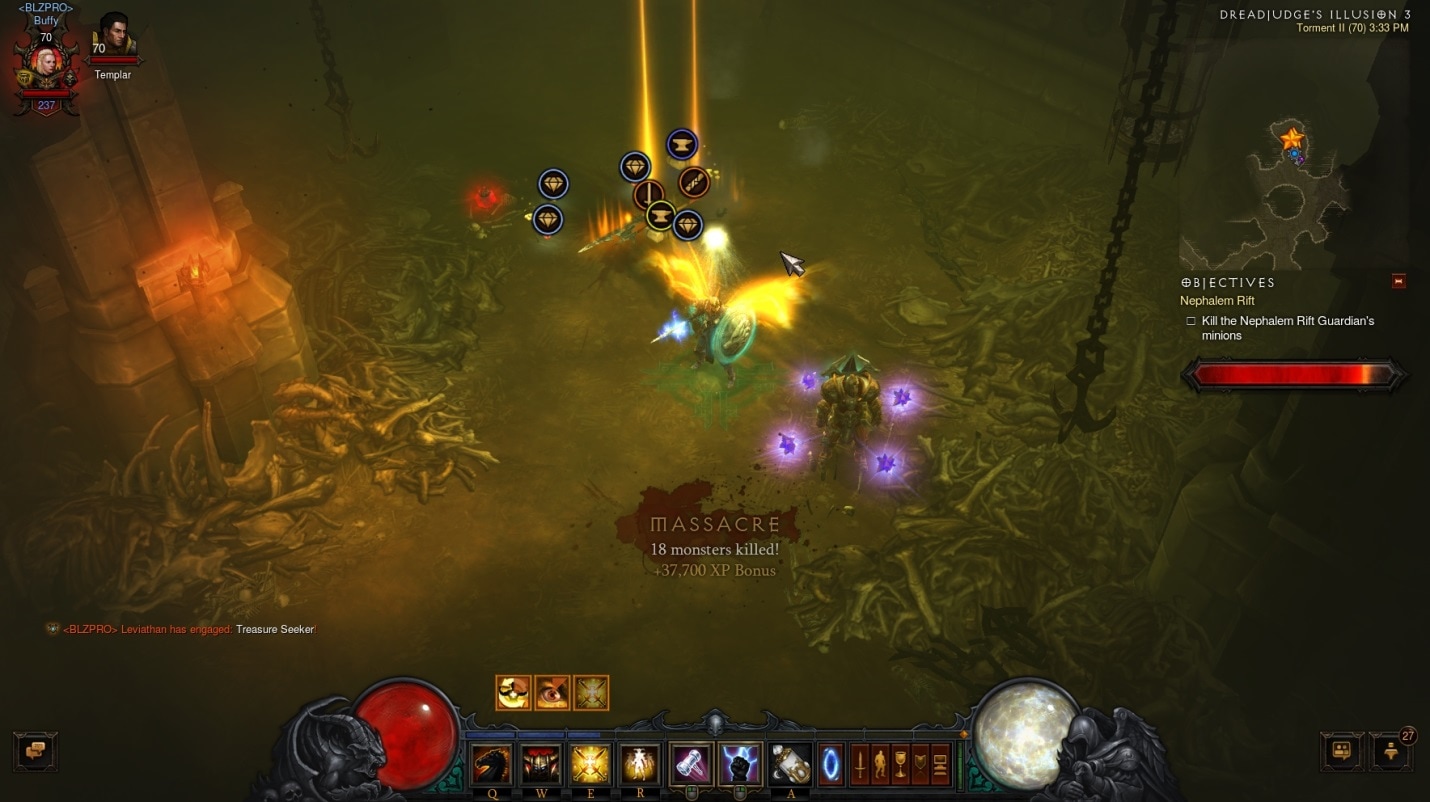
Also, it brings you loot. *Note: Does not actually increase your chances of loot.*
I've had a lot of fun experimenting with this build on my own Crusader. If you'd like to see it in action, tune in to tonight's livestream, I'll be playing it all day!
Tell Us What You Think!
Leviathan's Zoosader is a slight concept twist on a character you might not have imagined. Pets are usually the realm of Witch Doctors and Demon Hunters, but the Crusader has the ability to dip her toe in that pool and propser. A thematic build that's both conceptually and mechanically sound, the Zoosader works as advertised and performs admirably.
Are you ready to share your thoughts? What would you change if you had a Zoosader? Have you already given it a shot, and want to share your findings? Let us know in the comments, and be sure to send me your builds at TheorycraftThursday@blizzard.com. I'm definitely looking forward to seeing what you’ve got to share after Patch 2.0.5 and beyond!
The live stream is going on right now until 7PM PDT. You can watch it on the official Diablo Twitch channel.
This page is constantly being updated as information comes in.
- Tiered Rifts:
- The speed at which you clear a Tiered Rift will be a factor into how difficult the next one will be.
- Blizzard plans on using Tiered Rifts as a benchmark for balancing classes.
- They want all classes to be competitive at the highest level.
- Blizzard strike teams are extensively testing Tiered Rifts internally.
- Tiered Rifts is a placeholder name.
- Density will be slightly different than regular rifts. No details if it's more or less.
- Leaderboards are seperate for season and non season Tiered Rifts, also separated between normal and hardcore.
- Leaderboards are split up by group size. Solo and group play will not be competing for the same rank.
- Rift Changes:
- Tuning for all Rift bosses to bring them more in line with each other.
- Involves lowering the damage of some of the stronger attacks.
- Adjusting the Poison Clouds of the "Ghom" Rift Boss.
- Plan on tuning how much the progress bar moves for killing elites and different types of monsters, currently moves the same amount for all monsters killed.
- Pandemonium rifts were turned off as an option for rifts in the last patch.
- Gems:
- Josh Mosqueira hinted towards Legendary gems perhaps being a reward from Tiered Rifts.
- They know it's a problem that almost everyone uses Emeralds in weapons and they plan on working on it.
- Storage Space and Crafting Materials:
- No current plans for more stash space.
- Blizzard is considering changing the way various crafting materials are stored to be more like the way Blood Shards and Gold are counted. This would free up a lot of stash space if they are simply counted as a currency beside your gold.
- Seasons:
- You will be ranked per character and class.
- Blizzard mentioned that the ladder system in Path of Exile has many good ideas, the different length of ladder seasons being a major point.
- Every season will have new legendaries.
- When a season ends, things earned will carry over to the normal game.
- They plan on "changing" up seasons often. Large hints that they will not be simple race for the highest Paragon.
- Community Buffs:
- Blizzard enjoys the system of regular community buffs and you can expect more in the future.
- Monster Affixes:
- Ground effects such as Plagued are currently bugged and deal too much damage.
- Electrified may receive changes in future, not completely happy with it's current design and how it interacts with certain player skills such as hydra procing it too much.
- Transmogrification:
- Set items will be available for transmogrification in the future.
- You will not be able to transmogrify set items for a class you are not.
- Console Features on PC:
- There is no official announcement or guarantee but they are interested in bringing features exclusive to the console version over to the PC version.
- Nemesis System: If a monster kills you it has a chance jump into a portal and appear later in a friend’s game. If your friend kills it, both get rewarded, however if the monster kills them, it keeps getting stronger and jumps to another randomly chosen game from your friend’s friend list.
- Apprentice mode: If a lower level player pairs up with a higher level player, the system boosts the lower level player’s stats so that they can handle the action. You still gain experience and loot for your proper level though.
Here are some of the current console exclusive features:
- Clans & Communities:
- There are planning on improving the clan system, no details given however.
- Legendary Items:
- New Legendary items are planned.
- They want to connect elements to different effects, for example lightning is currently very attached to stun effects.
- There will be future items with elemental percent damage affix, they do not how ever want to make a "cindercoat" for every element.
- Set Items:
- Underwhelming set items will be revamped in a future patch.
- These are the set items currently planned for improvement:
- Firebird’s Finery
- Raiment of a Thousand Storms
- Monkey King’s Garb
- Thorns of the Invoker
- The Shadow’s Mantle
- Anniversary Buff:
- Does not apply to Kadala.
- Healing Stats:
- They want to improve healing stats and make them more compelling.
- Increasing the value of healing stats is an option. For example, doubling the life on hit stat on items.
- Moving them from Primary to Secondary stats was also discussed as an option.
- Lore & Story:
- The original idea for the second phase of the Malthael fight was that he would channel the power of the other Prime Evils from the Black Soulstone and cast the spells they used in Diablo 1 and 2.
- An early idea was that Leah could not properly control her powers and she would accidentally kill Deckard Cain.
- Skovos Isles were originally an idea of an area you would visit.
- Lorath was originally a nameless character sent to warn the Nephalem but quickly developed into a larger character. They felt it was important to save someone during the intro cinematic and it didn't feel right for the character to have no other impact on the story.
- There will most likely be a new angel of Justice now that Tyrael no longer fills that job.
- The ending heavily hints towards all the Prime Evils being released, not just Diablo.
- Misc Info:
- They want to keep the momentum going from Reaper of Souls. They are constantly thinking of new things to add.
- The battering ram in the Act 5 event to enter Pandemonium fortress does not move, the background however does.
- Art team primarily uses Maya and Photoshop.
- Constant struggle between things looking awesome and the amount skill effect clutter on the screen.